Forest
Forest v1.5.1
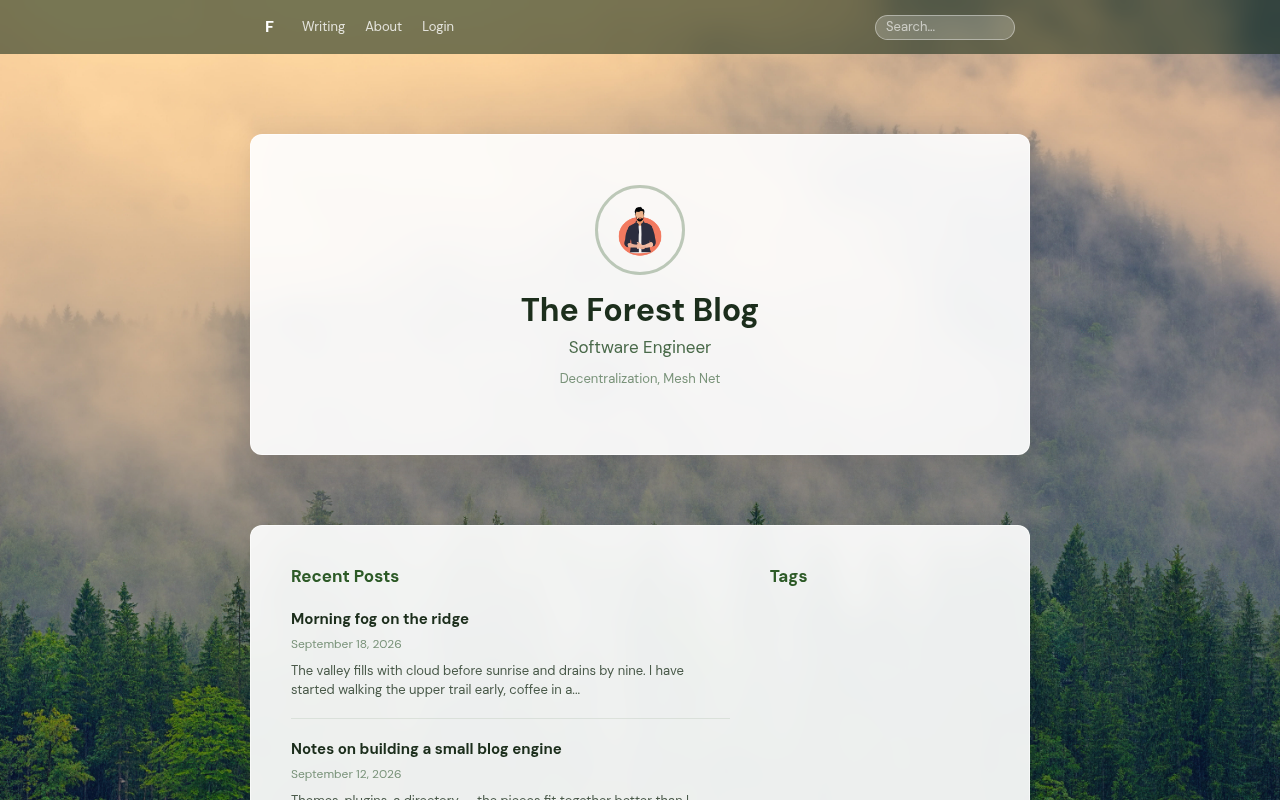
Misty greens, a soft serif and a full-bleed forest backdrop — goblog's forest theme.
- Version
- 1.5.1 (released 2026-10-17)
- Author
- Jason Ernst
- License
- Apache-2.0
- Source
- https://github.com/goblogplatform/goblog-theme-forest
- Requires
- goblog 0.14.0 or newer
- Download
- https://github.com/goblogplatform/goblog-theme-forest/archive/refs/tags/v1.5.1.zip
content hash893d8a8cda9d1ff5bed3e961957adb8c2d3f02643511702c4432831bbbe2e395
Install it from your own goblog under Admin → Themes.
README
Forest — a goblog theme
Misty greens, a soft serif and a full-bleed forest backdrop. This is the theme that ships compiled into goblog as forest, published as a directory theme so it can be installed and updated on its own.
Install
From your goblog: Admin → Themes → Browse → Forest → Install, then Activate. Requires goblog 0.5.0 or newer.
What it overrides
Only the public-facing templates (header, footer, home, post, the page types, tag, search, error, login) and static/css/goblog.css. Admin and wizard pages render from goblog's default theme, so they keep up with new goblog releases automatically.
Developing
Edit the files under templates/ and static/, drop the folder into a goblog checkout as themes/installed/forest/ (or point THEMES_INSTALLED_DIR at its parent) and set the theme setting to forest. Templates are Go html/template; see docs/THEME_CONTRACT.md for the contract.
Releasing
Tag vX.Y.Z and publish a GitHub release; the directory picks up the tag's archive. screenshot.png at the root is shown in the listing.
Changelog
1.5.1
- Removed
posts.html,presentations.html,projects.htmlandresearch.html. goblog never renders them (the Research page comes from the page templates), and three of them pointed at photos and a video goblog 0.15.0 no longer ships (goblog #677).
1.5.0
- The login page offers goblog's password form (the shared
_password_loginpartial) when the site has a password account, under the GitHub button. Until now a site with both GitHub login and a password admin showed only GitHub on this theme (goblog #666). - Requires goblog 0.14.0, the first release with password login and the partial.
1.4.1
- On a post page, the admin-only link sections (Backlinks, Linked Posts, External Links, External Backlinks) and the comments sit on cards like the post body. They were drawn straight onto the background photo, where the text was hard to read.
1.4.0
- The footer's "Powered by goblog" line comes from goblog's shared
_powered_bypartial instead of being written out in the theme. It now links to goblog.live rather than the GitHub repository, and a site can hide it with the Show "Powered by goblog" setting under Admin → Settings → Appearance (goblog #644). - Requires goblog 0.13.0, the first release with the partial; on anything older the theme's
footer.htmlreferences a template that does not exist.
1.3.0
- Signing in with GitHub is goblog's job now. The button is a plain link to
/login/github; the theme no longer assembles the authorize URL in an inline script, wherewindow.locationwent intoredirect_uriunescaped, nor handles the?code=that came back. goblog completes the exchange server-side against astateit minted, so a code obtained for one account can no longer be replayed into another visitor's browser (goblog #631, #637). - The button's own URL comes from the server too, as
.github_login_url, instead of being built with a template conditional in every theme (goblog #639). - Requires goblog 0.12.0, and the manifest now says so, so the installer refuses the combination rather than installing a theme whose sign-in button has no URL to point at. Upgrade goblog first. An older version of this theme still signs in on 0.12.0 — goblog restarts the flow when a callback arrives with no state (goblog #640) — but it gets there via a second round trip to GitHub, so update the theme rather than relying on that.
1.2.1
- Inline scripts that call jQuery and highlight.js wait for
DOMContentLoaded, so the theme keeps working when goblog defers its CDN scripts (goblog 0.11.0, goblogplatform/GoBlog#624). Without this, posts lose syntax highlighting and the GitHub login button does nothing. - The GitHub login button's
hrefis set during parse withdocument.getElementById(...).hrefinstead of jQuery, so the link is never briefly inert. - Backward compatible: still works on goblog 0.10.0.
1.2.0
- Post, page and comment bodies are rendered by goblog on the server; the theme no longer ships showdown or DOMPurify. Embeds that DOMPurify used to strip (YouTube, Instagram) work again, and the body reaches crawlers and link-preview bots.
- The comment Preview button shows the draft as plain text, since no markdown library is loaded on the page.
- Requires goblog 0.10.0.
1.1.0
- The search page includes goblog's shared
_search_resultspartial instead of rendering the post list itself, so plugin, theme and docs hits appear in the site search. The result colours the template used to set inline now come fromgoblog.css. - Requires goblog 0.8.0.
1.0.0
- First release as a directory theme: the built-in forest theme's public templates and CSS, layered on goblog's default theme.
Releases
v1.5.1 2026-10-17
Requires goblog 0.14.0 (unchanged).
What's changed
Removed four templates goblog never renders: posts.html, presentations.html, projects.html and research.html. The Research page renders through the page templates, so it is unaffected. Three of the removed templates pointed at photos and a video that goblog 0.15.0 no longer ships (goblogplatform/GoBlog#677).
Upgrading
Nothing to do. No template goblog uses has changed.
v1.5.0 2026-10-03
Requires goblog 0.14.0.
What's changed
The login page offers goblog's password form (the shared _password_login partial) under the GitHub button when the site has a password account, the admin account goblog 0.14.0's install wizard creates. Until now a site with both GitHub login and a password admin showed only GitHub on this theme (goblogplatform/GoBlog#666).
Upgrading
min_goblog_version is now 0.14.0, so the directory offers this only once your goblog is on that release. Upgrade goblog first.
v1.4.1 2026-10-03
Requires goblog 0.13.0 (unchanged from v1.4.0).
What's changed
On a post page, the link sections and the comments sit on cards. The admin-only sections (Backlinks, Linked Posts, External Links, External Backlinks) and the comments were drawn straight onto the background photo, outside the card the post body sits on, where the text was hard to read. Each group now gets its own card (#10).
Upgrading
Nothing to do beyond updating the theme from Admin → Themes.
v1.4.0 2026-10-03
Requires goblog 0.13.0.
What's changed
The footer's "Powered by goblog" line comes from goblog's shared _powered_by partial instead of being written out in the theme. It now links to goblog.live rather than the GitHub repository, and a site can hide it with the Show "Powered by goblog" setting under Admin → Settings → Appearance (goblogplatform/GoBlog#644).
Upgrading
min_goblog_version is now 0.13.0, the first release with the partial, so the directory offers this only once your goblog is on that release.
Upgrade goblog first. On anything older the theme's footer.html references a template that does not exist.
v1.3.0 2026-09-26
Requires goblog 0.12.0.
What's changed
Signing in with GitHub is goblog's job now. The button is a plain link to /login/github; the theme no longer assembles the authorize URL in an inline script — where window.location went into redirect_uri unescaped — nor handles the ?code= that came back. goblog completes the exchange server-side against a state it minted, so a code obtained for one account can no longer be replayed into another visitor's browser (goblogplatform/GoBlog#631, #637).
The button's own URL comes from the server too, as .github_login_url, rather than being built with a nested template conditional in every theme (goblogplatform/GoBlog#639).
Upgrading
min_goblog_version is now 0.12.0, so the directory offers this only once your goblog is on that release — it will not install a theme whose sign-in button has no URL to point at.
Upgrade goblog first. On 0.12.0 an older version of this theme still signs in, because goblog restarts the flow when a callback arrives with no state (goblogplatform/GoBlog#640), but it gets there via a second round trip to GitHub. Update the theme rather than relying on that.
v1.2.1 2026-09-23
Prepares the theme for goblog 0.11.0, which loads its CDN scripts with defer (goblogplatform/GoBlog#624).
What's changed
With defer, jQuery and highlight.js are not defined while the page is still parsing, so inline scripts that called them during parse would throw — no syntax highlighting, and a dead GitHub login button. Those calls now wait for DOMContentLoaded, which fires only after every deferred script has run.
footer.html—hljs.highlightAll()login.html— the?code=exchange and the email login form wiringlogin.html— the GitHub button'shrefis now set withdocument.getElementById(...).hrefduring parse, rather than through jQuery. It is never briefly inert, and that line no longer needs a library at all.
Compatibility
Install this before upgrading to goblog 0.11.0. A DOMContentLoaded handler behaves the same whether or not the scripts are deferred, so this release also works on goblog 0.10.0 — min_goblog_version is unchanged.
On 0.11.0 without this release, posts lose syntax highlighting and the GitHub login button does nothing.
v1.2.0 2026-09-23
- Post, page and comment bodies are rendered by goblog on the server; the theme no longer ships showdown or DOMPurify. Embeds that DOMPurify used to strip (YouTube, Instagram) work again, and the body reaches crawlers and link-preview bots.
- The comment Preview button shows the draft as plain text, since no markdown library is loaded on the page.
- Requires goblog 0.10.0. An older goblog would render blank post and page bodies; the installer enforces this.
v1.1.0 2026-09-22
- The search page includes goblog's shared
_search_resultspartial instead of rendering the post list itself, so plugin, theme and docs hits appear in the site search. The result colours the template used to set inline now come fromgoblog.css. - Requires goblog 0.8.0.
v1.0.0 2026-09-20
First release: the forest theme as a directory theme — goblog's built-in forest templates and CSS, layered on the default theme, with the backdrop bundled. Requires goblog 0.5.0 or newer.